
About heictojpg.im
heictojpg.im (heictojpg.im) is an independent website that provides a focused browser tool to convert HEIC and HEIF photos to high-quality JPG files locally on your device. There is no account wall, no upload step for conversion, and no ad-heavy multi-format suite—just a calm path from iPhone photos to widely compatible JPGs.
Who we are (E-E-A-T: Who)
heictojpg.im is operated as a specialized utility site for private HEIC→JPG conversion. We are not affiliated with, endorsed by, or sponsored by Apple, Microsoft, Google, Adobe, Canva, or other brands named only for compatibility context.
- Site: heictojpg.im
- Support email: support@heictojpg.im
- Policies: Privacy · Terms · Disclaimer
- Contact: Contact page
We publish honest product limits because trust is part of the product. If a claim cannot be verified (for example field-level EXIF keep rates), we do not market it.
How the converter works (E-E-A-T: How)
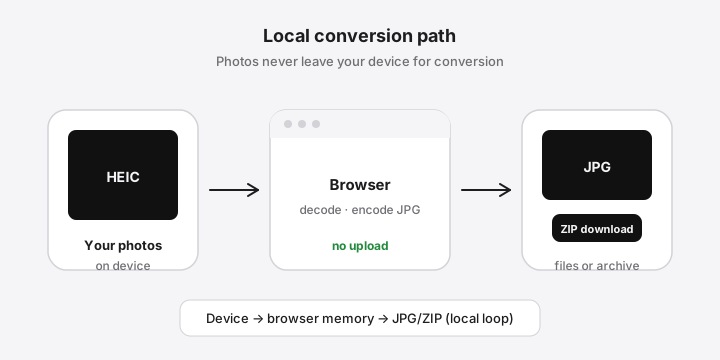
When you choose HEIC/HEIF files, decoding and JPG encoding run in your browser. Finished images are offered as downloads (and optional ZIP) from local browser memory. Conversion does not require a server API that receives your photo bytes.
- You select files with the system picker or drag-and-drop.
- The page queues files and converts with conservative concurrency.
- You download individual JPGs or a ZIP of completed results.
- Clearing the queue releases object URLs when you are done.
Technical limits are real: some HDR or multi-image HEIC variants fail in some browsers; JPG is lossy even at high quality; device RAM bounds large batches. We document these limits on the tool pages instead of hiding them.
Why this site exists (E-E-A-T: Why)
People search HEIC to JPG because recipients cannot open iPhone photos—especially on Windows. Many online tools solve that by uploading photos to a server. We built a private alternative: local conversion, free core use, batch ZIP, and transparent quality controls.
Our mission
Make HEIC conversion trustworthy: clear about what happens to your photos, honest about quality and device limits, and simple enough that the first action is “choose files,” not a multi-step wizard.
What we build
- Local HEIC → JPG decoding and encoding in the browser
- Batch queues with per-file progress, retry, and ZIP download
- Quality control so you can trade file size for sharpness on purpose
- Guides for batch, Windows, and HEIC vs JPG
What we don’t do
- We do not require sign-up to convert.
- We do not sell photo storage or cloud editing seats.
- We do not claim mathematical “lossless JPG,” instant “50 photos in one second,” or unlimited capacity on every phone.
- We do not ship EXIF promises we have not verified field-by-field.
- We do not claim to be the official Apple or Microsoft converter.
Who it’s for
- People who receive iPhone HEIC photos and need JPG for email, Windows, printers, or forms
- Anyone batch-converting a folder of vacation or work photos without installing codecs
- Users who prefer private, on-device processing over upload converters
Privacy and security stance
Conversion runs in your browser. Your photo bytes are not uploaded to our servers as part of the conversion path. The site is served over HTTPS. Hosting logs may include standard request metadata. Full detail: Privacy Policy.
Editorial standards
Guides are written for accuracy against the shipped product. We avoid fabricated speed benchmarks, fake reviews, and invented awards. When Windows Store codec packaging changes, treat Microsoft’s current documentation as the source of truth for native installs—our browser path remains the install-free alternative.
Contact
Questions, bugs, or privacy requests:
- Email: support@heictojpg.im
- Form context: Contact
Thanks for using heictojpg.im.